---- [ Runtime and Configuration settings ] ----

    WebPresenterPort : 9002
             version : 5.0.1-0
         description : Lynx Runtime Application
         productname : Lynx Runtime Application
            filename : RuntimeApplication.exe
           copyright : (c) 2025 Alphatron Marine B.V.
         description : Lynx Runtime Application
         lcffilename : Celebrity_Flora.LCF
         lcffilepath : C:\Projects\LynxComplete\LCF\Celebrity_Flora.LCF
         ProjectName : Celebrity Flora
      ProjectVersion : 1.0.0
       ProjectNumber : 001
              Author : Oba
               Notes :
---- [ list of Graphical configurations (id and name) ] ----

0,GraphicalConfiguration
1,MobileGraphicalConfiguration_
2,GraphicalConfiguration_1
3,GraphicalConfiguration_2
4,GraphicalConfiguration_3
5,GraphicalConfiguration_4
6,GraphicalConfiguration_5
7,GraphicalConfiguration_6
8,GraphicalConfiguration_7
9,GraphicalConfiguration_8
---- [ ApplicationInfo ] ----

servername : CI00934
application: C:\Projects\LynxComplete\RuntimeApplication\artifacts\x64\bin\Debug\RuntimeApplication.exe
working dir: C:\Projects\LynxComplete\RuntimeApplication
html dir   : C:/Projects/LynxComplete/RuntimeApplication/artifacts/x64/bin/Debug/html/
Build date : May 27 2025 10:15:23
retrieved @: 2025-05-28 10:14:44
started   @: 2025-05-28 10:08:13
----[ FontInfo ] ----

Noto Sans JP, url(/loadfont?name=NotoSans-Regular), format('truetype')
Noto Sans JP, url(/loadfont?name=NotoSans-SemiBold), format('truetype'), {weight: "550"}
Noto Sans JP, url(/loadfont?name=NotoSans-Bold), format('truetype'), {weight: "bold"}
Are You Serious, url(/loadfont?name=AreYouSerious-Regular), format('truetype')
----[ SocketInfo ] ----

  --( open sockets )--
  socket:   560+            127.0.0.1 2025-05-28 10:08:25 ---------- --:--:-- 0.00:06:19    [> GET /ping: GET /ping ]
  socket:   652             127.0.0.1 2025-05-28 10:14:43 ---------- --:--:-- 0.00:00:01    [>  ] [ probably Cancel-ed >]
  socket:   920             127.0.0.1 2025-05-28 10:14:43 ---------- --:--:-- 0.00:00:01    [> GET /LynxSVG: GET /LynxSVG?clientid=Edge_a75346f240d1,requestVersion=9775,configid=0 ]
  --( recently closed sockets )--
  socket:   940             127.0.0.1 2025-05-28 10:13:33 2025-05-28 10:13:42 0.00:00:09    [> GET /LynxSVG: GET /LynxSVG?clientid=Edge_a75346f240d1,requestVersion=8203,configid=0 ] [ probably Cancel-ed >]
  socket:   948             127.0.0.1 2025-05-28 10:14:33 2025-05-28 10:14:42 0.00:00:09    [>  ] [ probably Cancel-ed >]
  socket:   680             127.0.0.1 2025-05-28 10:14:13 2025-05-28 10:14:22 0.00:00:09    [>  ] [ probably Cancel-ed >]
  socket:   952             127.0.0.1 2025-05-28 10:13:23 2025-05-28 10:13:32 0.00:00:09    [> GET /LynxSVG: GET /LynxSVG?clientid=Edge_a75346f240d1,requestVersion=7951,configid=0 ] [ probably Cancel-ed >]
The BrowserClient info is grouped somewhat. Same or similar requests are merged to a single item.
----[ BrowserClients  ] ----

  r = synchroneous reply
  Q = asynchroneous reQuest
  A = asynchroneous Answer
  cnt = repeat count (with similar action)

    clientId: Firefox_8da4550b26fd
      ClientSocketInfo:
      --- answered (  560) req: 2025-05-28 10:31:32 <- LynxSVG +Firefox_8da4550b26fd + 0 ans: ---------- --:--:--
      history:
      ... 2025-05-28 10:28:49 sock:    0 r cnt:     0 version:     0 --creating-- BrowserClient
      ... 2025-05-28 10:31:32 sock:  560 Q cnt:    17 version: 35705 <- LynxSVG +Firefox_8da4550b26fd + 0
      ... 2025-05-28 10:31:32 sock:  560 A cnt:    17 version: 35950 -> answerSvg len:46835 txlen:6519 version:35950

    clientId: Edge_a75346f240d1
      ClientSocketInfo:
      --- answered (  968) req: 2025-05-28 10:31:20 <- LynxSVG +Edge_a75346f240d1 + 0 ans: ---------- --:--:--
      history:
      ... 2025-05-28 10:29:14 sock:    0 r cnt:     0 version:     0 --creating-- BrowserClient
      ... 2025-05-28 10:31:20 sock:  968 Q cnt:    10 version: 35636 <- LynxSVG +Edge_a75346f240d1 + 0
      ... 2025-05-28 10:31:20 sock:  968 A cnt:    10 version: 35662 -> answerSvg len:41941 txlen:5003 version:35662

    clientId: Edge_7fe755e3116
      ClientSocketInfo:
      --- answered (  968) req: 2025-05-28 10:31:35 <- LynxSVG +Edge_7fe755e3116 + 0 ans: ---------- --:--:--
      history:
      ... 2025-05-28 10:31:21 sock:    0 r cnt:     0 version:     0 --creating-- BrowserClient
      ... 2025-05-28 10:31:21 sock:  968 r cnt:     0 version:     0 GET /connected?clientid=Edge_7fe755e3116
      ... 2025-05-28 10:31:30 sock:  968 r cnt:     2 version:     0 POST /mouseevent?mousedown,btn=1,x=741.5,y=197.0,clientid=Edge_7fe755e3116,configid=0
      ... 2025-05-28 10:31:31 sock:  968 r cnt:     2 version:     0 POST /mouseevent?mouseup,btn=0,x=741.5,y=197.0,clientid=Edge_7fe755e3116,configid=0
      ... 2025-05-28 10:31:31 sock:  968 r cnt:    19 version:     0 POST /mouseevent?mousemove,btn=0,x=811.5,y=165.0,clientid=Edge_7fe755e3116,configid=0
      ... 2025-05-28 10:31:35 sock:  968 Q cnt:    15 version: 36000 <- LynxSVG +Edge_7fe755e3116 + 0
      ... 2025-05-28 10:31:35 sock:  968 A cnt:    15 version: 36023 -> answerSvg len:41972 txlen:4998 version:36023

    clientId: (ping)
      ClientSocketInfo:
      history:
      ... 2025-05-28 10:31:36 sock:    0 r cnt:     0 version:     0 --creating-- BrowserClient
      ... 2025-05-28 10:31:36 sock:  560 r cnt:     0 version:     0 GET /ping
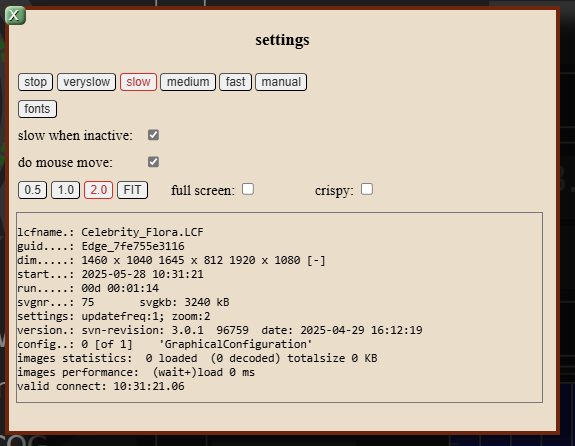
The buttons on the top-row specify the speed at which new requests are made. Recommended is 'medium' or 'fast'.
The fonts-button shows the fonts (in action)
slow when inactive - this should just be set to checked
do mouse move - normally this should be checked but for debugging the webpresenter or less output in the console of the browser, then it is better to disable the mouse move actions. Note that all mouse actions are 'POST'-ed to the webpresenter, although at the client side already some filtering is applied, in particular to mouse move actions.
The next row of buttons can be used to fit the svg on the client display. Probably the best choice is to leave it in 'FIT'-mode.
The information in the text box gives some general information, about the client and client connection.